Segment Anything 2 is an open source image segmentation model.
You can use Segment Anything 2 to identify the precise location of objects in an image. This process can generate masks for objects in an image iteratively, by specifying points to be included or excluded from the segmentation mask.
Execution Modes
Segment Anything 2 supports both local and remote execution modes when used in workflows:
- Local execution: The model runs directly on your inference server (GPU strongly recommended)
- Remote execution: The model can be invoked via HTTP API on a remote inference server using the
sam2_segment_image()client method
How to Use Segment Anything 2
To use Segment Anything 2 with Inference, you will need a Roboflow API key. If you don't already have a Roboflow account, sign up for a free Roboflow account. Then, retrieve your API key from the Roboflow dashboard.
How To Use SAM2 Locally With Inference
We will follow along with the example located at examples/sam2/sam2_example.py.
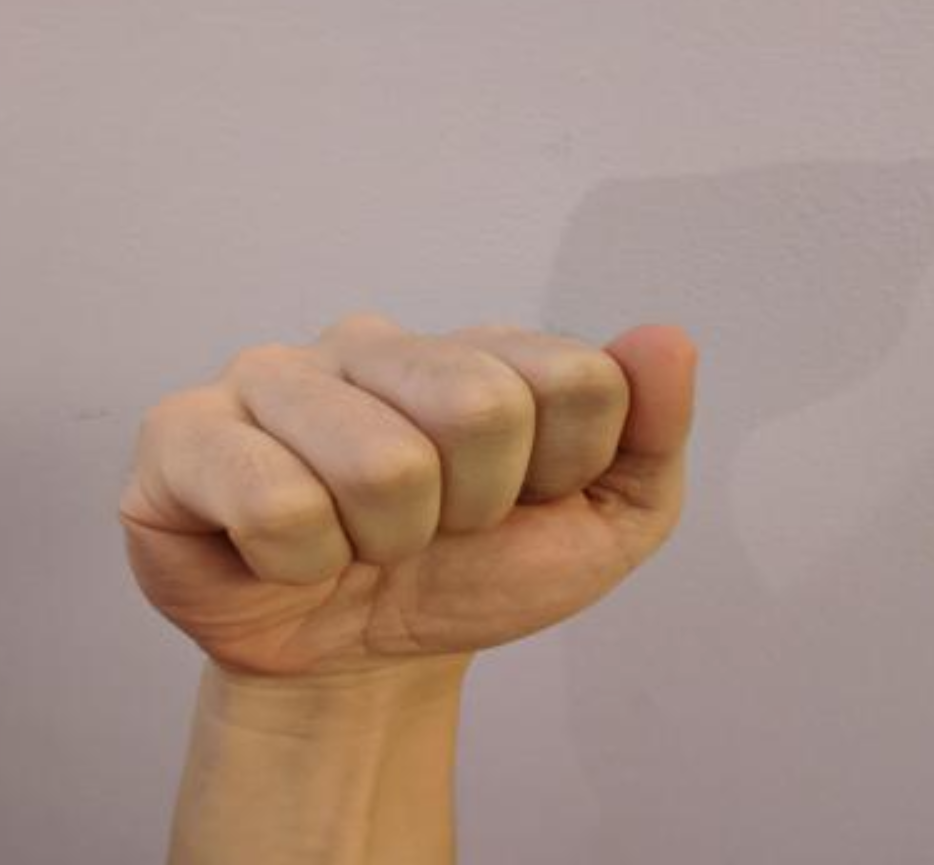
We start with the following image,
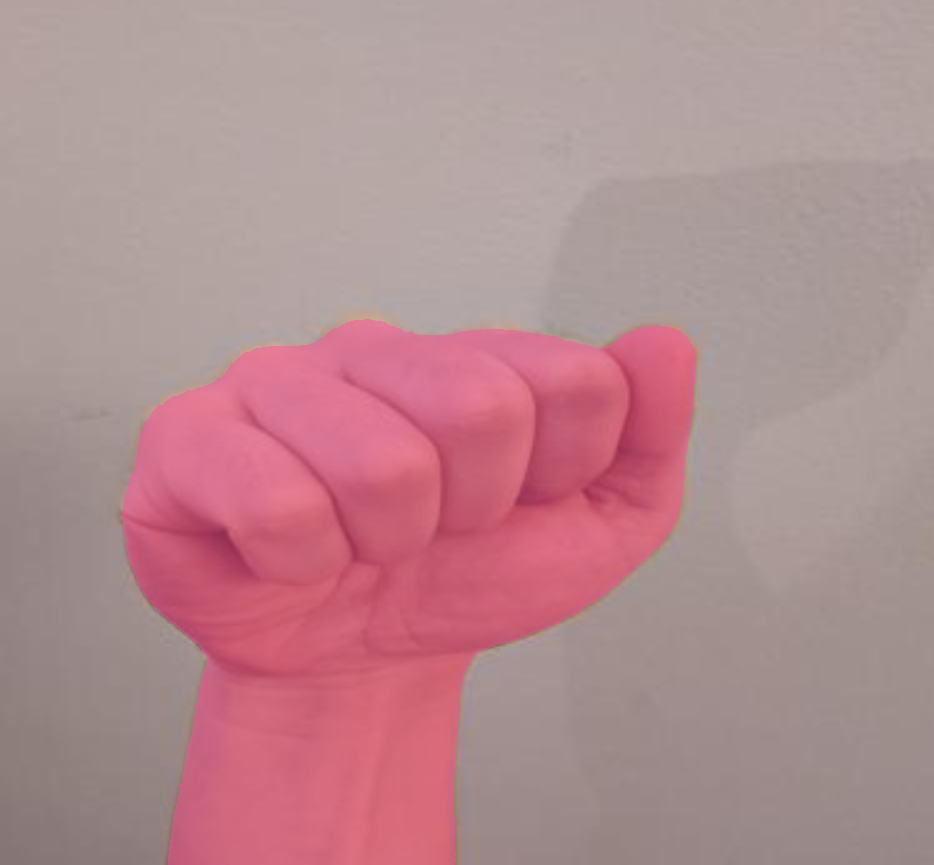
compute the most prominent mask,
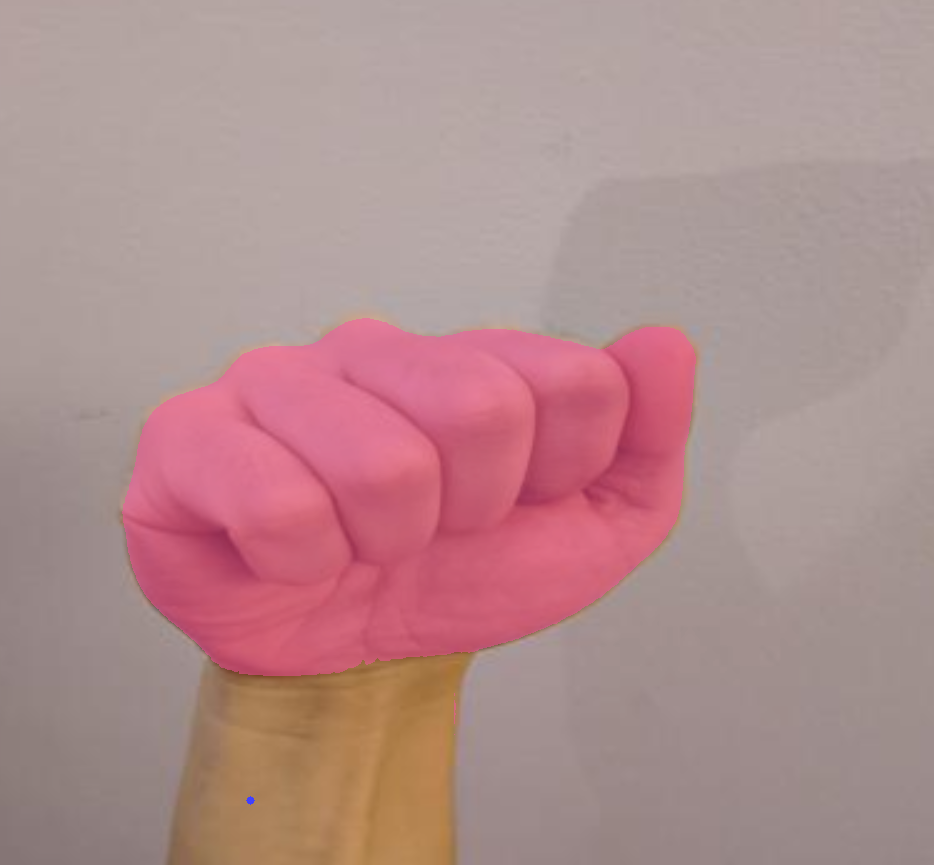
and negative prompt the wrist to obtain only the fist.
Running within docker
Build the dockerfile (make sure your cwd is at the root of inference) with
docker build -f docker/dockerfiles/Dockerfile.sam2 -t sam2 .
Start up an interactive terminal with
docker run -it --rm --entrypoint bash -v $(pwd)/scratch/:/app/scratch/ -v /tmp/cache/:/tmp/cache/ -v $(pwd)/inference/:/app/inference/ --gpus=all --net=host sam2
You can save files to /app/scratch/ to use them on the host device.
Or, start a sam2 server with
docker run -it --rm -v /tmp/cache/:/tmp/cache/ -v $(pwd)/inference/:/app/inference/ --gpus=all --net=host sam2
and interact over http.
Imports
Set up your api key, and install Segment Anything 2.
There's currently a problem with sam2 + flash attention on certain gpus, like the L4 or A100. Use the fix in the posted thread, or use the docker image we provide for sam2.
import os
os.environ["API_KEY"] = "<YOUR-API-KEY>"

from inference.models.sam2 import SegmentAnything2
from inference.core.utils.postprocess import masks2poly
from inference.core.entities.requests.sam2 import Sam2PromptSet
import supervision as sv
from PIL import Image
import numpy as np

image_path = "./examples/sam2/hand.png"
Model Loading
Load the model with
m = SegmentAnything2(model_id="sam2/hiera_large")
Other values for model_id are "hiera_small", "hiera_large", "hiera_tiny", "hiera_b_plus".
Compute the Most Prominent Mask
# call embed_image before segment_image to precompute embeddings
embedding, img_shape, id_ = m.embed_image(image_path)

# segments image using cached embedding if it exists, else computes it on the fly
raw_masks, raw_low_res_masks = m.segment_image(image_path)

# convert binary masks to polygons
raw_masks = raw_masks >= m.predictor.mask_threshold
poly_masks = masks2poly(raw_masks)
Note that you can embed the image as soon as you know you want to process it, and the embeddings are cached automatically for faster downstream processing.
The resulting mask will look like this:
Negative Prompt the Model
point = [250, 800]
label = False
# give a negative point (point_label 0) or a positive example (point_label 1)
prompt = Sam2PromptSet(
    prompts=[{"points": [{"x": point[0], "y": point[1], "positive": label}]}]
)

# uses cached masks from prior call

raw_masks2, raw_low_res_masks2 = m.segment_image(
    image_path,
    prompts=prompt,
)

raw_masks2 = raw_masks2 >= m.predictor.mask_threshold
raw_masks2 = raw_masks2[0]
Here we tell the model that the cached mask should not include the wrist.
The resulting mask will look like this:
Annotate
Use Supervision to draw the results of the model.
image = np.array(Image.open(image_path).convert("RGB"))

mask_annotator = sv.MaskAnnotator()
dot_annotator = sv.DotAnnotator()

detections = sv.Detections(
    xyxy=np.array([[0, 0, 100, 100]]), mask=np.array([raw_masks])
)
detections.class_id = [i for i in range(len(detections))]
annotated_image = mask_annotator.annotate(image.copy(), detections)
im = Image.fromarray(annotated_image)
im.save("sam.png")

detections = sv.Detections(
    xyxy=np.array([[0, 0, 100, 100]]), mask=np.array([raw_masks2])
)
detections.class_id = [i for i in range(len(detections))]
annotated_image = mask_annotator.annotate(image.copy(), detections)

dot_detections = sv.Detections(
    xyxy=np.array([[point[0] - 1, point[1] - 1, point[0] + 1, point[1] + 1]]),
    class_id=np.array([1]),
)
annotated_image = dot_annotator.annotate(annotated_image, dot_detections)
im = Image.fromarray(annotated_image)
im.save("sam_negative_prompted.png")
How To Use SAM2 With a Local Docker Container HTTP Server
Build and Start The Server
Build the dockerfile (make sure your cwd is at the root of inference) with
docker build -f docker/dockerfiles/Dockerfile.sam2 -t sam2 .
and start a sam2 server with
docker run -it --rm -v /tmp/cache/:/tmp/cache/ -v $(pwd)/inference/:/app/inference/ --gpus=all --net=host sam2
Embed an Image
An embedding is a numeric representation of an image. SAM uses embeddings as input to calculate the location of objects in an image.
Create a new Python file and add the following code:
import requests

infer_payload = {
    "image": {
        "type": "base64",
        "value": "https://i.imgur.com/Q6lDy8B.jpg",
    },
    "image_id": "example_image_id",
}

base_url = "http://localhost:9001"

# Define your Roboflow API Key
api_key = "YOUR ROBOFLOW API KEY"

res = requests.post(
    f"{base_url}/sam2/embed_image?api_key={api_key}",
    json=infer_payload,
)
This code makes a request to Inference to embed an image using SAM.
The example_image_id is used to cache the embeddings for later use so you don't have to send them back in future segmentation requests.
Segment an Object
To segment an object, you need to know at least one point in the image that represents the object that you want to use.
For testing with a single image, you can upload an image to the Polygon Zone web interface and hover over a point in the image to see the coordinates of that point.
You may also opt to use an object detection model to identify an object, then use the center point of the bounding box as a prompt for segmentation.
Create a new Python file and add the following code:
#Define request payload
infer_payload = {
    "image": {
        "type": "base64",
        "value": "https://i.imgur.com/Q6lDy8B.jpg",
    },
    "point_coords": [[380, 350]],
    "point_labels": [1],
    "image_id": "example_image_id",
}

res = requests.post(
    f"{base_url}/sam2/embed_image?api_key={api_key}",
    json=infer_payload,
)

masks = res.json()['masks']
This request returns segmentation masks that represent the object of interest.